 Walk Analytics
 Every Step. Tracked.
Health and fitness insights from your daily movement.










Your data, your questions
Ask AI about your training sessions
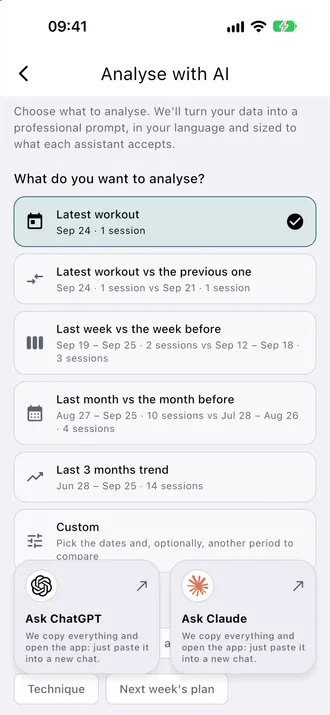
Turn a session or a period of training into a question with context. The app prepares a prompt from the data you choose, ready for your own AI assistant.
- Review your latest session
- Compare your latest session with the previous one
- Compare weeks or months and discuss load, recovery or technique
- Select a session or comparison period, then choose what you want to understand.
- Choose ChatGPT or Claude. Review the data you agree to share before pasting and sending the prepared text.
- The app copies your prepared text and opens the assistant. Paste it into a new chat, review it and send it yourself.
What happens to my data?
Metrics and the prepared question are generated locally on your device. This feature uses no AnalyticsZone AI server and sends no prompt automatically. You copy the text, open your own assistant, then decide whether to paste and send it. The AI provider processes only what you send under its own policy and account settings.Read the privacy policy
What do I need?
You can explore the analysis options without Premium. Copying the prompt and opening the assistant require Premium. You use your own ChatGPT or Claude account; their access limits and terms apply separately.
Screenshots
See Walk Analytics in action
Real app screens for reviewing your walk data.
FEATURES
Advanced Walk Analytics Features
Gait Analysis
Stride length, cadence, asymmetry, and double support time from Apple Watch data.
VO₂max & Fitness
Estimate cardiovascular fitness from walking data and track improvement over time.
Walking Zones
Personalized heart rate zones for walking. Know when you are in aerobic or fat-burning range.
Health Score
A single score combining mobility, cardiovascular fitness, and activity consistency.
Trend Analysis
Weekly and monthly walking trends with automatic anomaly detection.
Analysis on your device
Analysis and AI question preparation run locally, without an AnalyticsZone AI server. You choose whether to copy the text and send it using your own assistant.
Walk Analytics
Ready to elevate your game?
Choose the sport-specific analytics application that fits your athletic goals.